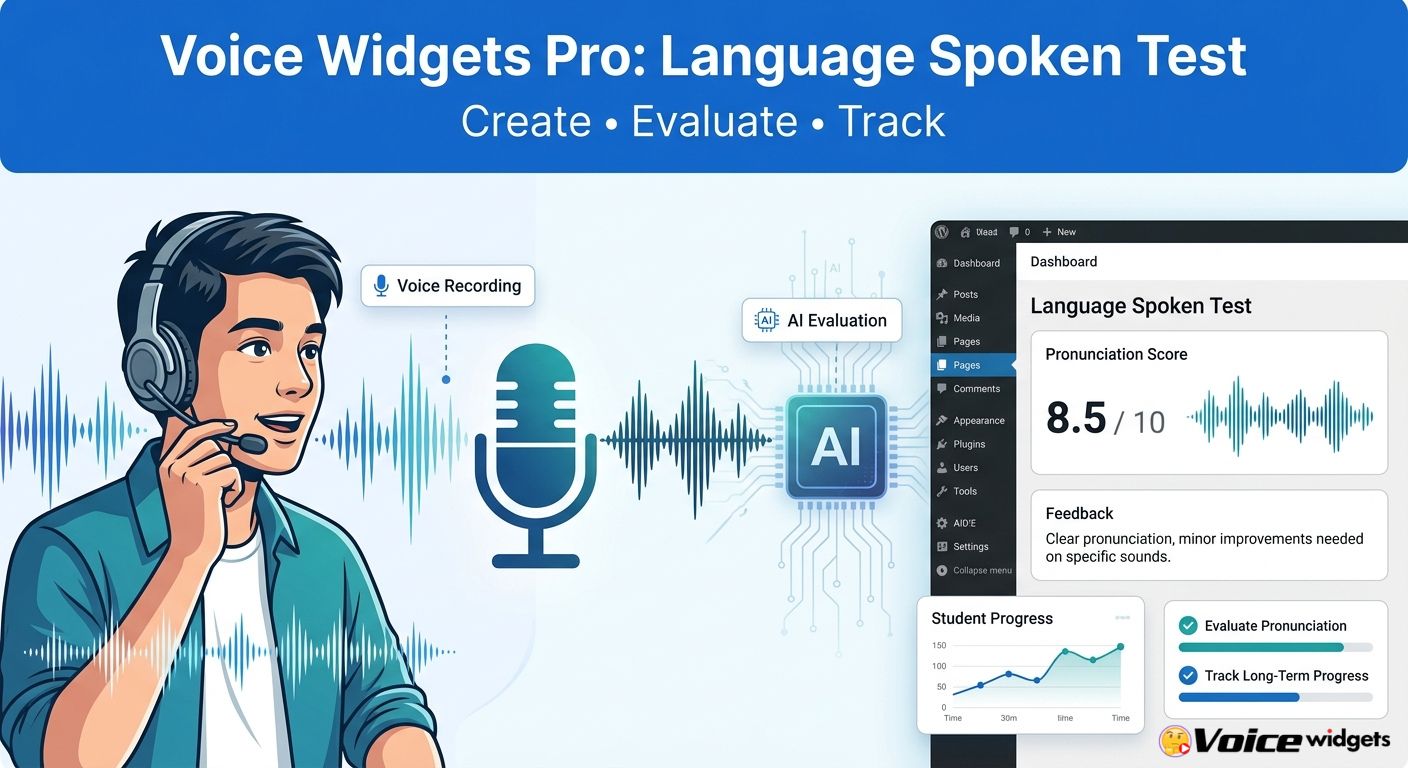
 Voice Widgets Pro turns WordPress into a voice-based language assessment environment where teachers can create spoken tests, students can record answers, and teachers can review or automatically evaluate recordings. Voice Widgets Pro supports unlimited language-learning speaking tests, front-end delivery through shortcodes, manual grading, AI evaluation, reference audio, randomized questions, exam mode, roleplay, and spaced-repetition features.
Voice Widgets Pro can run spoken-language assessment with or without AI, giving WordPress site owners control over recording, assessment, feedback, and student progress. Voice Widgets Pro also stores language-test data on the site’s server according to the product documentation, while AI-dependent features can send relevant audio or transcription data to the configured external AI/speech service.
Why does a written language test miss the skill students actually need?
Voice Widgets Pro addresses the gap between knowing a language on paper and actually speaking the language aloud. A written quiz can measure vocabulary, grammar, and reading comprehension, while Voice Widgets Pro adds a practical speaking layer where students must produce spoken words and sentences.
Voice Widgets Pro lets language teachers create speaking exercises around individual words, phrases, or complete sentences. Students can then record their voices directly from a WordPress page instead of typing an answer into a traditional form.
Voice Widgets Pro supports language-learning tests that can be presented through WordPress shortcodes. A teacher can therefore place a speaking assessment inside a lesson page, course page, student dashboard, or dedicated examination page.
A useful architecture looks like this:
Teacher creates test → Voice Widgets Pro displays question → Student listens → Student records → Voice Widgets Pro stores recording → Teacher or AI evaluates → Voice Widgets Pro displays result → Student practices weak areas.
That workflow makes Voice Widgets Pro more than a simple microphone widget. Voice Widgets Pro connects content delivery, voice recording, assessment, and progress tracking inside WordPress.
How can Voice Widgets Pro create interactive spoken-language tests?
Voice Widgets Pro gives language teachers a practical way to build spoken-language tests from words and sentences. Voice Widgets Pro supports unlimited language-learning speaking tests, allowing a WordPress website to contain multiple tests for different courses, levels, lessons, or student groups.
Why does Voice Widgets Pro start with the question bank?
Voice Widgets Pro can organize spoken assessments around multiple words and sentences instead of forcing teachers to create a separate WordPress page for every question. A teacher can build a larger collection of questions and use testing modes to change how students encounter those questions.
Voice Widgets Pro supports randomized live tests that can select a subset of questions from a larger question bank. For example, a teacher could create 50 vocabulary questions and configure a test to present 10 randomly selected questions, reducing predictable question ordering.
| Language Test Requirement | Voice Widgets Pro Approach |
| Word-based speaking practice | Voice Widgets Pro supports words and sentences |
| Large question bank | Voice Widgets Pro supports multiple questions |
| Random questions | Voice Widgets Pro supports randomized tests |
| Front-end delivery | Voice Widgets Pro supports shortcodes |
| Student recording | Voice Widgets Pro records student speech |
| Teacher assessment | Voice Widgets Pro supports manual grading |
| Automated assessment | Voice Widgets Pro supports AI evaluation |
| Exam attempts | Voice Widgets Pro supports one-shot Exam Mode |
Voice Widgets Pro randomized testing can be particularly useful for repeated assessments. A student who memorizes the order of questions on one attempt has less advantage when Voice Widgets Pro generates another randomized selection.
How can Voice Widgets Pro make students listen before speaking?
Voice Widgets Pro supports a Listen & Repeat mode where students hear a teacher reference recording before the recording control becomes available. Voice Widgets Pro can therefore turn a simple pronunciation question into a structured listening-and-speaking exercise.
Voice Widgets Pro reference audio gives students a target pronunciation before students attempt their own recording. The reference recording can be used for vocabulary, phrases, sentence patterns, pronunciation drills, or teacher-led speaking exercises.
Voice Widgets Pro also supports a shadowing visualizer designed around the shadowing technique. The Voice Widgets Pro workflow can therefore move students from passive listening into immediate spoken repetition.
A simple lesson might look like:
- Voice Widgets Pro displays the target sentence.
- Voice Widgets Pro plays the teacher’s reference recording.
- Voice Widgets Pro enables student recording.
- Voice Widgets Pro captures the student’s pronunciation.
- Voice Widgets Pro makes the recording available for assessment.
How can Voice Widgets Pro turn ordinary practice into an actual exam?
Voice Widgets Pro Exam Mode supports a one-shot recording workflow designed for formal assessments. Voice Widgets Pro can lock the widget after a single attempt, making the configuration more suitable for midterms, finals, placement assessments, or controlled speaking evaluations.
Voice Widgets Pro one-shot recording can reduce repeated retries during an assessment. Teachers should still combine Voice Widgets Pro Exam Mode with normal WordPress authentication, course permissions, and institutional examination policies when a high-stakes assessment requires stronger identity or anti-cheating controls.
Voice Widgets Pro Exam Mode should not be described as a complete proctoring system. Voice Widgets Pro controls the configured recording interaction, but webcam monitoring, identity verification, browser lockdown, and human proctoring require separate systems or procedures.
How does Voice Widgets Pro evaluate pronunciation with AI and voice feedback?
Voice Widgets Pro supports both manual grading and automatic AI evaluation for spoken-language tests. Voice Widgets Pro can therefore operate as a teacher-controlled assessment tool when AI is unavailable or unnecessary, while AI-powered workflows can reduce repetitive evaluation work.
Voice Widgets Pro uses speech-recognition technologies such as OpenAI Whisper and Google Cloud Speech in its language-learning and speech-to-text workflows. Voice Widgets Pro documentation describes speech recognition as a way for learners to speak words or sentences and receive recognition-based feedback.
What happens technically after a student presses Record?
Voice Widgets Pro first needs microphone access through the student’s browser before Voice Widgets Pro can capture speech. Modern browser microphone permissions must be granted by the student, and microphone failures can occur when browser permissions, device permissions, HTTPS configuration, or input devices are misconfigured.
Voice Widgets Pro then uploads or processes the recorded audio according to the configured workflow. The subsequent speech-recognition or AI step can transform spoken audio into machine-readable information that supports assessment.
A simplified technical pipeline is:
Student Browser
↓
Microphone Permission
↓
Voice Widgets Pro Recorder
↓
Audio Recording
↓
Speech-to-Text / AI Service
↓
Recognition / Evaluation
↓
Voice Widgets Pro Result
↓
Teacher + Student Feedback
Voice Widgets Pro should be deployed with HTTPS because browser microphone permissions depend on secure browser contexts in normal production environments. Voice Widgets Pro users should also test microphone permissions across the browsers and devices used by students.
How can Voice Widgets Pro combine AI assessment with teacher judgment?
Voice Widgets Pro does not require AI for every speaking assessment. Voice Widgets Pro supports manual grading, allowing teachers to listen to student recordings and assign scores without depending on an external AI service.
Voice Widgets Pro manual grading is valuable when pronunciation requires human interpretation. Accents, regional pronunciation, communication context, hesitation, fluency, and classroom-specific criteria can make teacher judgment useful even when automated speech recognition is available.
Voice Widgets Pro automatic AI evaluation can reduce repetitive grading for large volumes of recordings. A teacher can use Voice Widgets Pro AI evaluation for initial scoring and reserve human review for recordings that need closer attention.
A practical hybrid model is:
AI evaluates → Voice Widgets Pro flags questionable results → Teacher reviews → Voice Widgets Pro stores final grade.
This approach avoids treating AI as an unquestionable examiner.
Can Voice Widgets Pro support contextual speaking instead of isolated words?
Voice Widgets Pro includes an AI-powered contextual roleplay capability designed to move speaking practice beyond isolated vocabulary. Voice Widgets Pro documentation gives examples such as waiter-versus-customer scenarios where AI can evaluate pronunciation accuracy and contextual appropriateness.
Voice Widgets Pro contextual roleplay can make speaking practice closer to real communication. A student can practice functional language rather than simply repeating vocabulary from a list.
For example:
| Assessment Type | Voice Widgets Pro Example |
| Vocabulary | Voice Widgets Pro asks students to pronounce “restaurant” |
| Sentence | Voice Widgets Pro asks students to repeat a complete sentence |
| Shadowing | Voice Widgets Pro plays reference audio before recording |
| Roleplay | Voice Widgets Pro evaluates a waiter/customer interaction |
| Exam | Voice Widgets Pro permits one recording attempt |
| Random test | Voice Widgets Pro selects questions from a larger bank |
Voice Widgets Pro contextual roleplay should still be treated as an instructional assessment aid rather than a perfect measure of communication competence. Human teachers should define grading criteria and review unusual or ambiguous AI results.
How can Voice Widgets Pro track student results and long-term progress?
Voice Widgets Pro provides a WordPress dashboard workflow for reviewing speaking-test results and scoring student recordings. Voice Widgets Pro also supports a front-end shortcode that allows logged-in students to view their results.
Voice Widgets Pro result tracking creates a bridge between one-time testing and continuous language practice. Teachers can use stored recordings and scores to identify students or vocabulary items that need additional practice.
Why does Voice Widgets Pro need more than a single score?
Voice Widgets Pro becomes more useful when a speaking score leads to another learning action. A 55% pronunciation score should not simply become an archived number; the score should help identify what the student should practice next.
Voice Widgets Pro includes an automated spaced-repetition workflow where lower-accuracy words can enter a review queue. Voice Widgets Pro documentation describes a mastery model in which words can require 90% or higher scores on three separate days before being marked completed.
That creates a cycle:
Test → Identify weak word → Review → Retest → Improve → Master.
How can Voice Widgets Pro use spaced repetition for speaking practice?
Voice Widgets Pro Spaced Repetition System can turn weak pronunciation results into future review tasks. Voice Widgets Pro can prioritize words that students have not mastered instead of treating every vocabulary item equally.
Voice Widgets Pro mastery scoring can require repeated successful performance rather than accepting one high score as permanent mastery. The documented example uses a 90%+ score across three separate days as the completion condition.
For a student with 100 vocabulary items, a practical progression could look like:
- Voice Widgets Pro identifies 18 weak words.
- Voice Widgets Pro moves low-accuracy words into review.
- Voice Widgets Pro presents repeated speaking practice.
- Voice Widgets Pro requires stronger scores for mastery.
- Voice Widgets Pro removes consistently mastered words from intensive review.
This is more actionable than simply telling a student, “Your pronunciation score was 72%.”
How can Voice Widgets Pro help teachers grade hundreds of recordings?
Voice Widgets Pro includes teacher-oriented grading features designed to reduce repetitive review work. Voice Widgets Pro documentation describes an AI-flagged review workflow that can highlight recordings below defined score thresholds or recordings with unusually high attempt counts.
Voice Widgets Pro priority grading can help teachers focus attention on recordings that require human review. A teacher does not necessarily need to listen to every recording with equal scrutiny when automated evaluation can help identify potential problems.
Voice Widgets Pro bulk grading features can further reduce repetitive administrative actions. The documented workflow includes rapid review and pass/fail-style actions for short recordings.
For example, suppose a course generates:
30 students × 20 speaking questions = 600 recordings.
If a teacher spends an average of 45 seconds reviewing each recording, the manual workload is:
600 × 45 seconds = 27,000 seconds = 450 minutes = 7.5 hours.
If Voice Widgets Pro AI evaluation allows a teacher to manually review only 30% of recordings:
600 × 30% = 180 recordings
180 × 45 seconds = 135 minutes = 2.25 hours.
The theoretical saving is:
7.5 hours − 2.25 hours = 5.25 hours per assessment cycle.
The actual result depends on recording length, AI accuracy, teacher criteria, and how many recordings require human review.
What does Voice Widgets Pro cost compared with building a custom speaking-test system?
Voice Widgets Pro currently lists annual Personal and Professional plans plus a lifetime Master plan on the vendor’s product page. The listed pricing is $39/year for Personal, $89/year for Professional, and $149/$119 lifetime pricing shown for Master, with site limits of 1, 5, and up to 10 sites respectively.
| Requirement | Voice Widgets Pro | Custom WordPress Development |
| Browser recording | Included | Requires development |
| Language test interface | Included | Custom development |
| WordPress integration | Native plugin approach | Custom integration |
| Manual grading | Supported | Custom development |
| AI evaluation | Supported | API development required |
| Random tests | Supported | Custom development |
| Exam Mode | Supported | Custom development |
| SRS | Supported | Custom database logic |
| Student results | Supported | Custom dashboard |
| Maintenance | Plugin updates | Developer maintenance |
| AI API costs | Separate where applicable | Separate |
| Hosting | Existing WordPress hosting | Existing WordPress hosting |
Voice Widgets Pro can be economically attractive when a WordPress site already exists and the alternative is commissioning custom recording, testing, grading, and reporting functionality. Voice Widgets Pro does not eliminate hosting or third-party AI costs, but Voice Widgets Pro can reduce the amount of custom application code required.
How should developers control Voice Widgets Pro server resource usage?
Voice Widgets Pro audio workflows can consume more storage and bandwidth than ordinary text forms because voice recordings are binary media rather than small text fields. Voice Widgets Pro deployments with hundreds or thousands of student recordings should therefore plan storage capacity before opening large assessments.
Voice Widgets Pro administrators should calculate expected audio storage using recording count, average duration, encoding format, and retention period. A simple planning formula is:
Required storage ≈ students × recordings per student × average recording size × retention cycles.
For example:
500 students × 20 recordings × 1 MB = 10,000 MB, or approximately 10 GB.
Voice Widgets Pro administrators should also monitor PHP upload limits, WordPress media/storage capacity, database growth, web-server disk usage, and outbound API traffic. Exact server requirements depend on recording length, concurrent users, hosting architecture, and AI processing configuration.
How should Voice Widgets Pro manage OpenAI, Gemini, and DeepSeek API token costs?
Voice Widgets Pro AI workflows should be budgeted separately from the plugin license whenever external AI services are configured. Voice Widgets Pro product documentation explicitly identifies OpenAI-powered transcription and AI features, while third-party AI pricing depends on the selected provider and model.
Voice Widgets Pro administrators should not assume that an annual plugin license includes unlimited third-party AI usage. API providers generally meter usage according to their own billing models, so administrators should configure provider-side spending limits, monitor usage, and avoid sending unnecessarily long prompts or repeated audio.
Voice Widgets Pro deployments using OpenAI, Gemini, or DeepSeek should verify that the selected Voice Widgets Pro version actually supports the intended provider before presenting provider-specific integration as a built-in feature. The current public Voice Widgets Pro product documentation explicitly documents OpenAI and Google Cloud Speech workflows, so unsupported provider integrations should not be represented as native Voice Widgets Pro features without verification.
How should Voice Widgets Pro handle GDPR and voice-recording privacy?
Voice Widgets Pro language tests create personal-data considerations because student voice recordings can be associated with identifiable student accounts. Voice Widgets Pro documentation states that data is saved only on the site’s server, while AI or speech-recognition workflows can introduce external processing depending on configuration.
Voice Widgets Pro administrators should define a data-retention policy before collecting student recordings. A sensible policy should specify what is collected, why recordings are collected, how long recordings remain available, who can access recordings, and when recordings are deleted.
A WordPress implementation should consider:
- Voice Widgets Pro student identifier
- Voice Widgets Pro test identifier
- Voice Widgets Pro question identifier
- Voice Widgets Pro recording reference
- Voice Widgets Pro score
- Voice Widgets Pro teacher feedback
- Voice Widgets Pro submission timestamp
- Voice Widgets Pro AI-processing status
Voice Widgets Pro deployments should also document any external AI processor involved in speech recognition or evaluation. GDPR compliance depends on the complete data flow, contracts, legal basis, retention settings, user rights, hosting location, and third-party processors—not simply on whether Voice Widgets Pro is installed.
Does Voice Widgets Pro have a security vulnerability history developers should investigate?
Voice Widgets Pro developers should treat the public changelog and security scanning as separate sources of information. The public WordPress.org changelog records multiple historical bug fixes, including JavaScript issues, AJAX-related fixes, a disallowed-comment-keys issue, and later language-training and speech-to-text updates.
Voice Widgets Pro currently has no CVEs listed by WP-Safety’s public analysis for the plugin, but WP-Safety’s code analysis also identifies areas that deserve developer review. WP-Safety reports two unprotected AJAX entry points in its analyzed version, use of unserialize, and output-escaping concerns; these are automated-analysis findings rather than proof of exploitable vulnerabilities.
Voice Widgets Pro developers should therefore avoid claiming that “no CVEs” means “no security risk.” Developers should keep Voice Widgets Pro updated, review WordPress capability checks and nonces, validate uploaded audio, restrict file types, escape output, protect AJAX endpoints, and perform independent security testing for sensitive deployments.
How should Voice Widgets Pro handle webhook latency?
Voice Widgets Pro webhook workflows should separate the student’s recording experience from slow external processing whenever the surrounding integration supports asynchronous processing. A synchronous request that waits for speech recognition, AI evaluation, CRM delivery, and another external service can create unnecessary timeout risk.
Voice Widgets Pro integrations should use a queue-based architecture when external processing becomes slow or unpredictable. A practical sequence is:
Recording saved → Voice Widgets Pro marks submission as pending → External service processes job → Webhook returns result → Voice Widgets Pro updates result → Student dashboard displays status.
Voice Widgets Pro administrators should monitor HTTP timeout limits, webhook response times, retry behavior, duplicate events, and idempotency. A webhook handler should safely process the same event more than once because network retries can produce duplicate delivery attempts.
What should developers test before launching Voice Widgets Pro language exams?
Voice Widgets Pro production testing should cover the entire student journey rather than only checking whether the microphone button appears.
Voice Widgets Pro administrators should test microphone permissions, recording, upload, grading, student results, AI processing, and mobile browser behavior before opening an exam.
Use this launch checklist:
| Test Area | Voice Widgets Pro Production Check |
| HTTPS | Voice Widgets Pro microphone access works |
| Chrome | Voice Widgets Pro recording works |
| Edge | Voice Widgets Pro recording works |
| Safari | Voice Widgets Pro recording works |
| Mobile | Voice Widgets Pro recording works |
| Permissions | Voice Widgets Pro handles microphone denial |
| Upload | Voice Widgets Pro handles failed uploads |
| Storage | Voice Widgets Pro has sufficient disk capacity |
| AI | Voice Widgets Pro handles AI failures gracefully |
| Manual grading | Voice Widgets Pro teacher workflow works |
| Results | Voice Widgets Pro student results display correctly |
| Exam Mode | Voice Widgets Pro one-shot behavior works |
| Random tests | Voice Widgets Pro selects expected question counts |
| SRS | Voice Widgets Pro review logic works |
| Security | Voice Widgets Pro permissions and upload validation are tested |
How can Voice Widgets Pro turn WordPress into a complete language-speaking workflow?
Voice Widgets Pro connects three important layers: interactive test creation, pronunciation evaluation, and long-term progress tracking. Voice Widgets Pro therefore gives WordPress site owners a way to build speaking-focused learning experiences without starting from an entirely custom learning application.
Voice Widgets Pro’s first pillar is test creation. Voice Widgets Pro lets teachers create spoken-language questions, reference recordings, randomized tests, Listen & Repeat activities, shadowing exercises, and one-shot examinations.
Voice Widgets Pro’s second pillar is assessment. Voice Widgets Pro supports manual teacher grading and automatic AI evaluation, giving educators flexibility over how speech recordings are reviewed.
Voice Widgets Pro’s third pillar is progress. Voice Widgets Pro provides speaking-test results, student result access, AI-assisted review workflows, automated reporting concepts, difficulty scaling, and spaced repetition for continued practice.
What is the real value of Voice Widgets Pro for language teachers?
Voice Widgets Pro gives WordPress educators a practical route from traditional written testing to interactive spoken assessment. Voice Widgets Pro combines browser-based voice recording with language-test workflows, teacher grading, AI-assisted assessment, and progress-oriented practice.
Voice Widgets Pro is especially relevant for language schools, private tutors, online course creators, WordPress LMS sites, and educators who already manage learning content through WordPress. Voice Widgets Pro can fit into an existing WordPress environment instead of requiring a separate speaking-test application.
Voice Widgets Pro should be evaluated as an assessment component rather than a complete replacement for a language-learning methodology. The strongest implementation combines Voice Widgets Pro automation with clear rubrics, teacher oversight, privacy controls, reliable hosting, and carefully designed speaking exercises.
Voice Widgets Pro ultimately follows a simple learning loop: create a speaking task, capture the student’s voice, evaluate performance, identify weaknesses, and repeat targeted practice. That loop is the core reason Voice Widgets Pro can turn an ordinary WordPress site into a more interactive language-speaking environment.
Voice Widgets Pro Language Spoken Test: Frequently Asked Technical Questions
Voice Widgets Pro supports manual grading without requiring automatic AI evaluation. Teachers can review student voice recordings and assign scores manually.
Voice Widgets Pro documentation states that data is saved only on the site's server, although specific AI or transcription workflows may involve external speech or AI services.
Voice Widgets Pro Exam Mode supports a one-shot recording configuration that locks the widget after a single attempt. This feature can reduce repeated recording attempts.
Voice Widgets Pro supports randomized live tests that can select a defined number of questions from a larger question bank. This randomization feature can make assessments less predictable.
Voice Widgets Pro supports spaced repetition and mastery-oriented workflows. Weak speaking results can convert into repeated review activities based on the documented mastery conditions.
Voice Widgets Pro audio workflows can consume more storage and bandwidth due to voice recordings. Administrators should plan storage capacity based on recording count, duration, encoding format, and retention period.
Voice Widgets Pro language tests create personal-data considerations due to student voice recordings. Administrators should define a data-retention policy and consider GDPR compliance regarding data flow and external AI processors.
Final Verdict: Can Voice Widgets Pro make WordPress a serious spoken-language testing tool?
Voice Widgets Pro can add a surprisingly complete spoken-language assessment workflow to WordPress. Voice Widgets Pro covers the three areas that matter most: interactive speaking-test creation, pronunciation evaluation, and student progress tracking.
Voice Widgets Pro is strongest when teachers use the product as a structured assessment workflow rather than simply adding a microphone button to a page. Voice Widgets Pro’s randomized tests, Listen & Repeat mode, Exam Mode, AI evaluation, manual grading, roleplay, SRS, and results functionality create a more complete learning loop.
Voice Widgets Pro also gives developers important control points around storage, AI usage, privacy, security, and integrations. A production deployment should therefore combine Voice Widgets Pro configuration with WordPress security best practices, HTTPS, controlled API usage, data-retention policies, backups, monitoring, and regular plugin updates.
For WordPress-based language schools, tutors, course creators, and education websites, Voice Widgets Pro provides a direct way to add speaking assessment without building every recording and grading component from scratch. Voice Widgets Pro turns the WordPress site into the place where students can listen, speak, record, receive feedback, practice weak areas, and track improvement.